1 min read
Teams – You can now add a shared calendar to a channel
As you know Teams is heavily used for team collaboration, letting users the ability to have group conversation, share files or even integrate with...
This new feature is only available through Outlook Web Access (aka OWA, aka Outlook on the Web).
When you use OWA to access your calendar (https://outlook.office.com/calendar/) you will have a refreshed ‘Add calendar’ which then will also gives you the ability to add a personal calendar from Outlook.com, Google or Teams Snap.
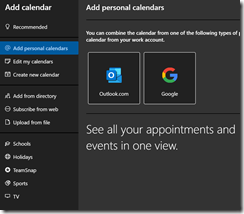
To access this new UI and option, you just need to go to your Calendar using OWA and then click the Add calendar option
![image_thumb[1]](https://www.cubesys.com.au/hubfs/Imported_Blog_Media/image_thumb1-104.png "image_thumb[1]")