1 min read
Intune – You can now monitor your Windows Defender devices from the portal
As you know, you can manage Windows Defender settings by creating device configuration profiles using Intune/Endpoint Configuration Manager,...
The close integration of SCCM and Intune/Endpoint Configuration Manager has made one more step.
As you know, you can now see Device Collections and SCCM Client Details from the Intune/Endpoint Configuration Manager (see https://t.co/mp0I0MntlM).
Well, now you can also get access to the CMPivot feature (see https://docs.microsoft.com/en-us/mem/configmgr/core/servers/manage/cmpivot), a timeline showing the last activities or Resource Explorer from the device details blade when using the Intune/Endpoint Configuration Manager portal.
To access these details, logon to your Intune/Endpoint Configuration Manager portal (https://endpoint.microsoft.com/) and access the DevicesAll Devices blade
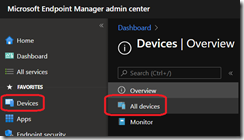
Then pick the device you want to access one of the features listed above
![image_thumb[1]](https://www.cubesys.com.au/hubfs/Imported_Blog_Media/image_thumb1-245.png "image_thumb[1]")
![image_thumb[2]](https://www.cubesys.com.au/hubfs/Imported_Blog_Media/image_thumb2-189.png "image_thumb[2]")
![image_thumb[3]](https://www.cubesys.com.au/hubfs/Imported_Blog_Media/image_thumb3-148.png "image_thumb[3]")