1 min read

Intune – You can now launch script from SCCM from the Intune portal

If you are using System Center Configuration Manager Current Branch (SCCM Current Branch) version 2006 in a co-management configuration with Intune/Endpoint Configuration Manager, you can now launch the scripts created in SCCM from the Endpoint Configuration Manager portal.

Before being able to do it, you first need of course to have created a script in SCCM (see https://docs.microsoft.com/en-us/mem/configmgr/apps/deploy-use/create-deploy-scripts).

Then you need to have the appropriate PowerShell version and/or modules called by your script on your client devices (in case of course you have to run your script with a specific version of PowerShell or specific modules); otherwise the script will fail to execute.

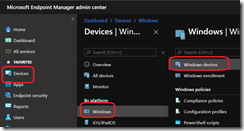
Then you can connect to your Endpoint Configuration Manager portal (https://endpoint.microsoft.com/) to access the DevicesWindowsWindows Devices blade

image_thumb

Then select the device on which you want to get the script executed and access the Scripts blade to select the script to run

image_thumb[1]

Depending of your script configuration you may (or may not) see an output on the right side; the script I used for this blog is just doing a Write-Host

image_thumb[2]

Intune / SCCM – You can now launch device sync and device action activities from the Intune portal

If you are working with System Center Configuration Manager Current Branch 2002 (SCCM CB 2002) and Intune/Endpoint Configuration Manager in a...

Read More

Intune – you can now get details about devices in co-management configuration

As you know, you can have System Center Configuration Manager (SCCM)/Endpoint Configuration Manager (on-premises) working in some sort of hybrid...

Read More

Intune – Intune/Endpoint Configuration Manager is moving away from the Azure portal

As you Intune administration was first released with his own portal (known as Silverlight portal), then has been integrated to the Azure...

Read More