1 min read
Teams – New and simpler way to search for apps
As you know, Microsoft Teams is an extensible platform, providing integration with other systems through Teams Apps.
1 min read
By now, you know Microsoft Teams, the unified communication and collaboration platform.
You also know the Teams menu to manage client settings available by clicking on your picture from the Teams client
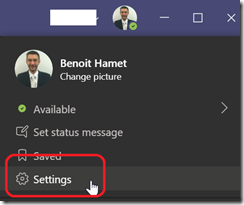
But did you know there is an hidden menu with a lot more options available?
To access this hidden menu, you need to press the Shift key and double-click quickly on the Teams icon in the systray and then immediately right click on the icon; this will make this hidden menu appear.
![image_thumb[1]](https://www.cubesys.com.au/hubfs/Imported_Blog_Media/image_thumb1-103.png "image_thumb[1]")
From there you have a lot of option, from managing client restart to rollback an update or do testing or reregistering SIP protocol
![image_thumb[2]](https://www.cubesys.com.au/hubfs/Imported_Blog_Media/image_thumb2-80.png "image_thumb[2]")
![image_thumb[3]](https://www.cubesys.com.au/hubfs/Imported_Blog_Media/image_thumb3-66.png "image_thumb[3]")
![image_thumb[4]](https://www.cubesys.com.au/hubfs/Imported_Blog_Media/image_thumb4-53.png "image_thumb[4]")
You even generate a WebRTC dump or change the Teams channel used for update
![image_thumb[5]](https://www.cubesys.com.au/hubfs/Imported_Blog_Media/image_thumb5-34.png "image_thumb[5]")
![image_thumb[8]](https://www.cubesys.com.au/hubfs/Imported_Blog_Media/image_thumb8-21.png "image_thumb[8]")
![image_thumb[7]](https://www.cubesys.com.au/hubfs/Imported_Blog_Media/image_thumb7-24.png "image_thumb[7]")
Or define a zoom setting
![image_thumb[9]](https://www.cubesys.com.au/hubfs/Imported_Blog_Media/image_thumb9-11.png "image_thumb[9]")
![image_thumb[10]](https://www.cubesys.com.au/hubfs/Imported_Blog_Media/image_thumb10-10.png "image_thumb[10]")
Some of these hidden options are quite self explanatory, some a little bit more confusing. Many seems more related to specific needs like troubleshooting or development.
Unfortunately there is not much documentation available to detail all these options.
Enjoy with this trick 