1 min read
Teams – You can manage Teams Meeting backgrounds
As you know Teams has been allowing end-users to either blur or set a custom background for their meeting.
After allowing you to blur the background when joining a Teams meeting, you can now set your own background (well quite not fully yours).
You can now choose from a pre defined set of backgrounds – being able to set your own is coming soon.
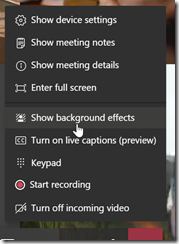
To set your background just hit the Options (…) button and choose Show background effects, you can then choose from a pre defined list of backgrounds
![image_thumb[1]](https://www.cubesys.com.au/hubfs/Imported_Blog_Media/image_thumb1-127.png "image_thumb[1]")
UPDATE 1 a colleague of mine just let me know you can copy your own background file in
%userprofile%AppDataRoamingMicrosoftTeamsBackgroundsUploads and it will be available to choose from the Show background effects list
UPDATE 2 another colleague of mine just let me know the same tip for Mac use, you can copy your own background file in
/users/<your username>/Library/Application Support/Microsoft/Teams/Backgrounds/Uploads and it will be available to choose from the Show background effects list